Tide It › Mac

New · Native Mac app

Tides, real wind and swell, big on your Mac.

Tide It for Mac is not the iPhone app on a bigger screen: it is a real Mac window, with a sidebar, a tide curve across the full width and the day in detail beside it. Plan your kitesurfing, wing foiling, sailing or surf session calmly, from your desk.

macOS 26 or laterDesktop widgetsOffline tidesOne subscription for iPhone, iPad and Mac12 languages
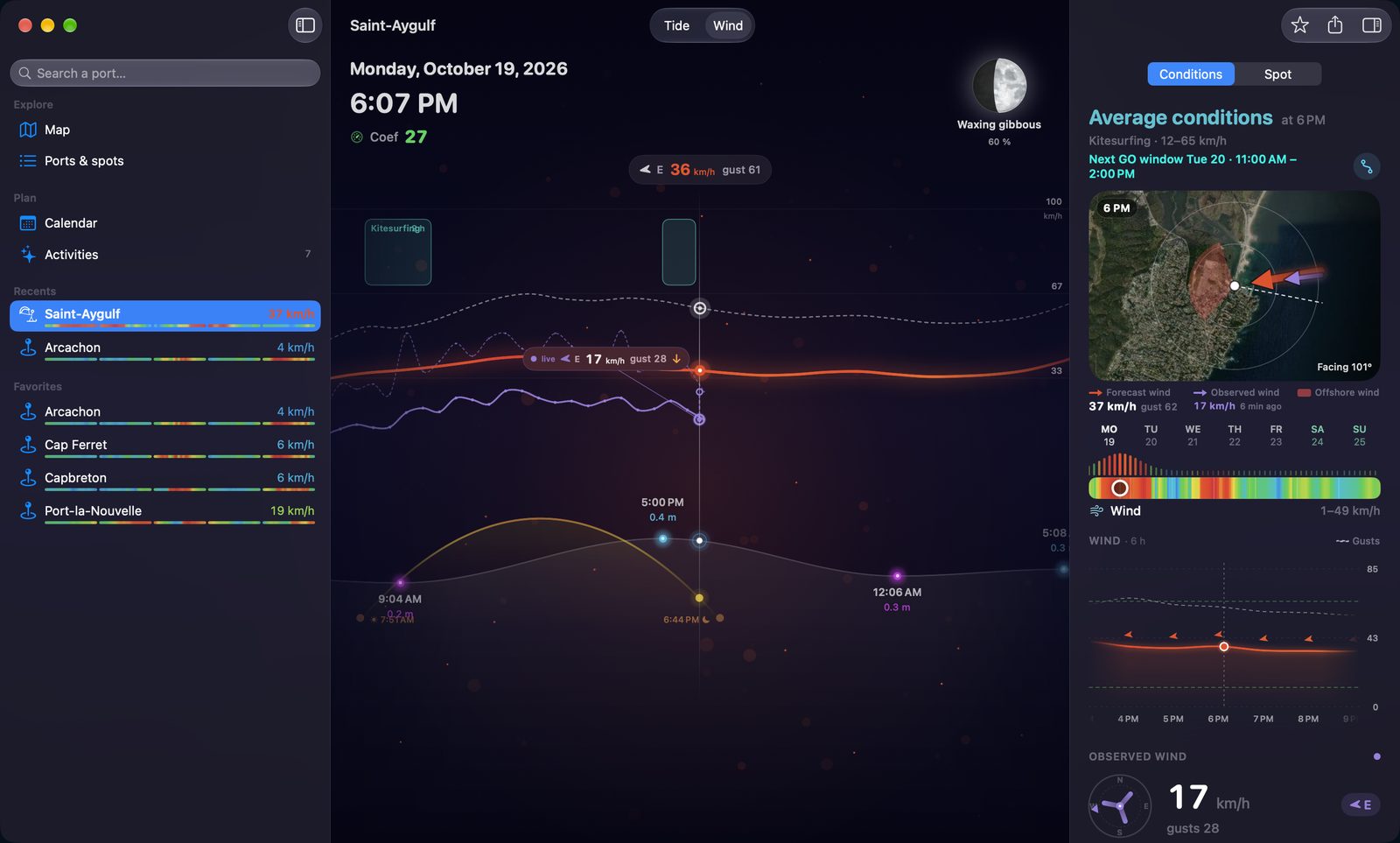
Tide It for Mac in Wind mode: the forecast and measured wind curve across the whole window, and in the right column the verdict for your sport, the spot view, the week's wind and a six-hour zoom, with your spots in the sidebar
Designed for the Mac

Everything that makes a session, on one screen.

On an iPhone, you scroll. On a Mac, everything sits side by side: the day's curve, the tide, the current, the measured wind and the week's weather. Press and hold the curve to read any hour; scroll it with the trackpad or drag it with the mouse to move back or forward in time.

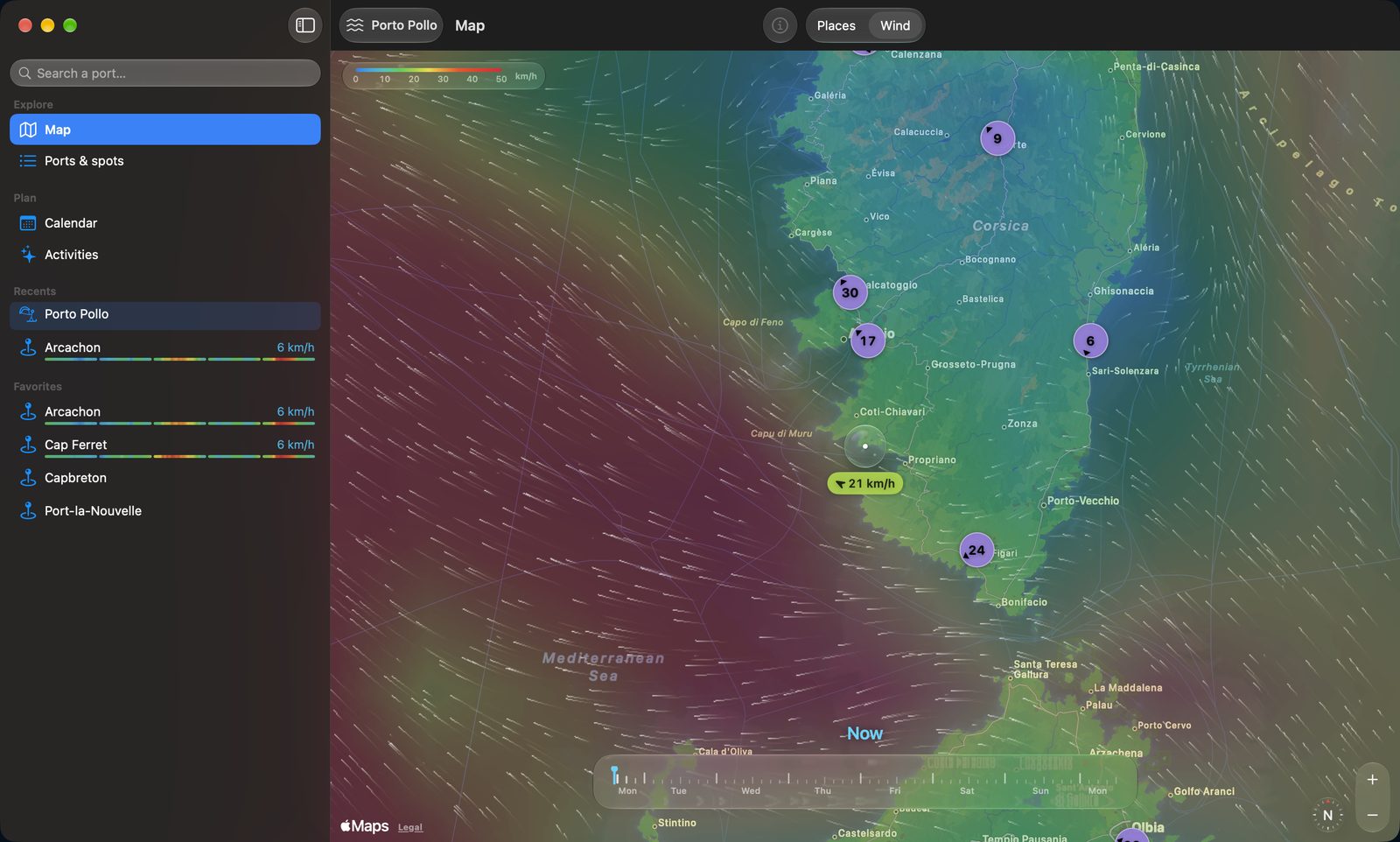
Animated wind map on Mac: the forecast wind around Corsica and Sardinia, trails that follow the wind, the drop in the center reading the wind speed and the 7-day timeline at the bottom
Wind map

The next 7 days of wind, along the whole coast.

A veil colored by wind strength, trails that flow with it, and a timeline to move hour by hour into next week. Drop the water drop on a spot: it reads the forecast wind right there. Finding the windiest beach of the weekend takes a second.

  • Smooth animation, rendered by the Mac's graphics chip
  • Places or Wind, one click in the toolbar
  • The finest model available, never an average of models that smooths out the coast
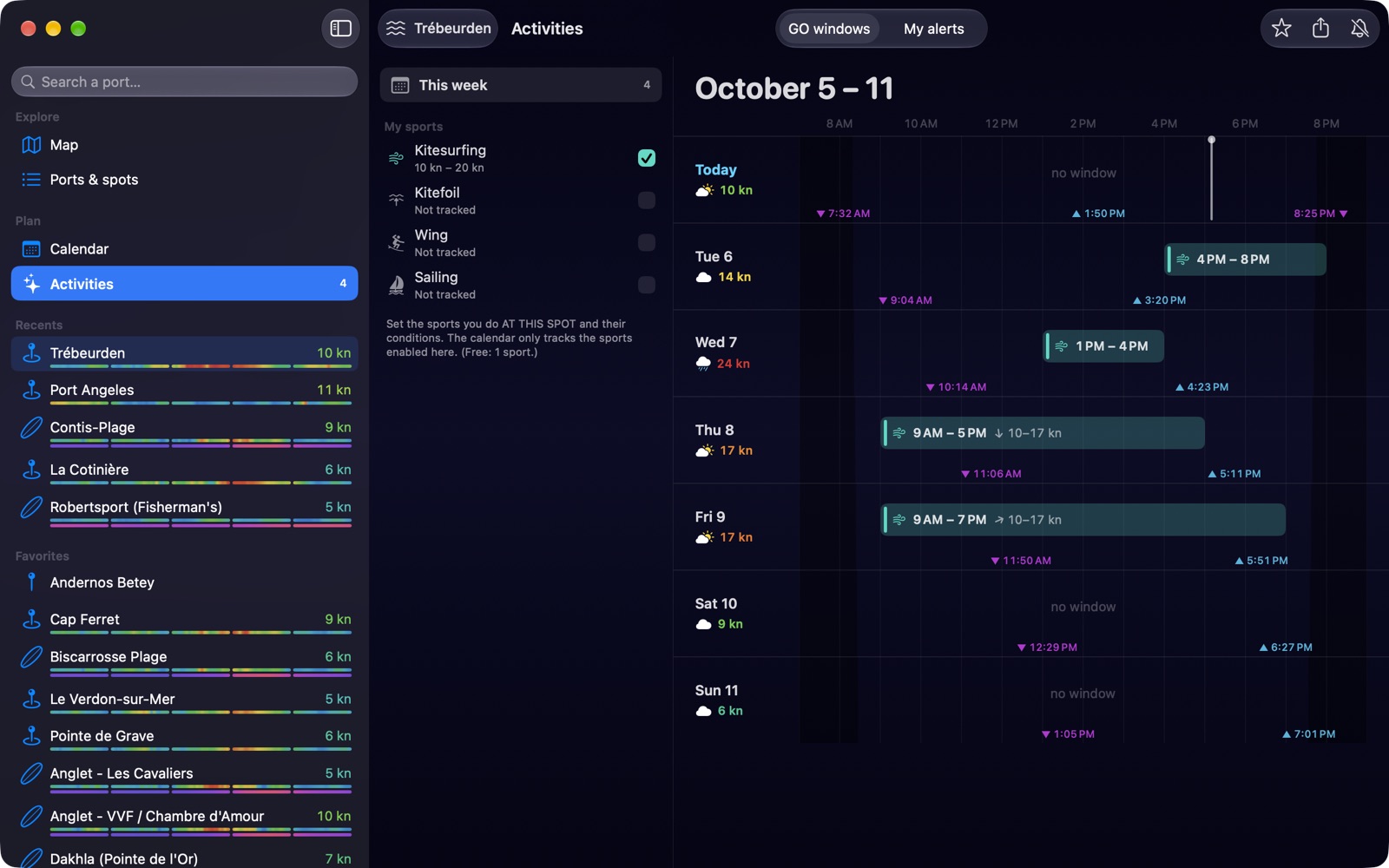
GO windows on Mac: the kitesurfing week day by day, with time slots, forecast wind, tides, sunrise and sunset
GO windows

Your best sessions of the week, sport by sport.

Kitesurfing, kitefoiling, wing foiling, sailing or surfing: Tide It crosses wind, tide, swell and daylight with your settings and skill level, then shows you the whole week at a glance. Click a slot for the hour-by-hour detail, and find it on the curve.

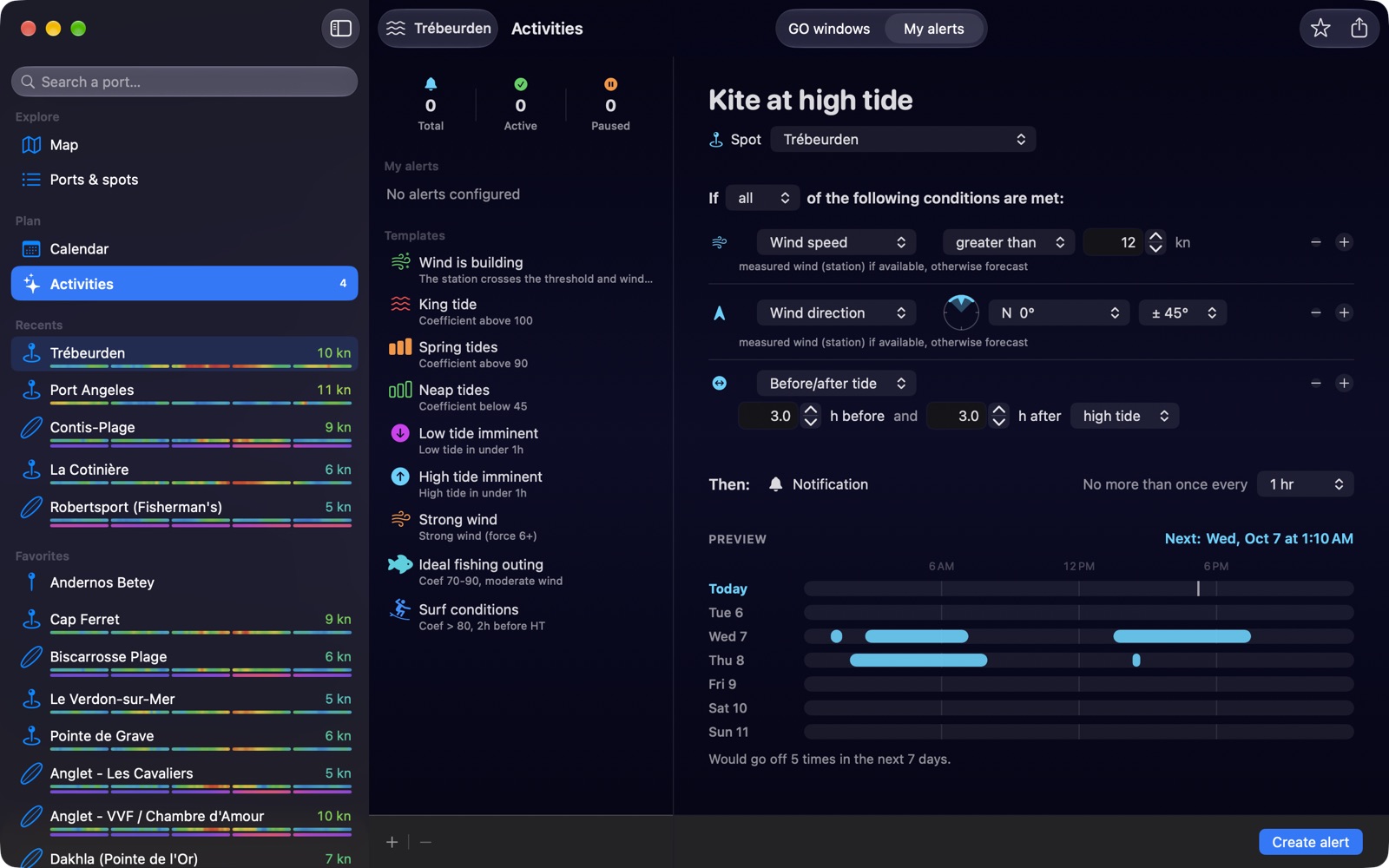
Alert editor on Mac, built like a rule: wind speed, direction and time around the tide, with a live preview of the next 7 days
Alerts

Alerts built like Mail rules.

“If all of the following conditions are met”: one line per condition — wind speed and direction, water height, tidal coefficient, time before or after the tide, sunrise or sunset. The 7-day preview updates as you type, and tells you how many times the alert would fire.

  • Wind direction is picked on a drawn dial
  • It fires when the conditions come together, not at high tide
  • Closing the window does not quit the app: its alerts keep running
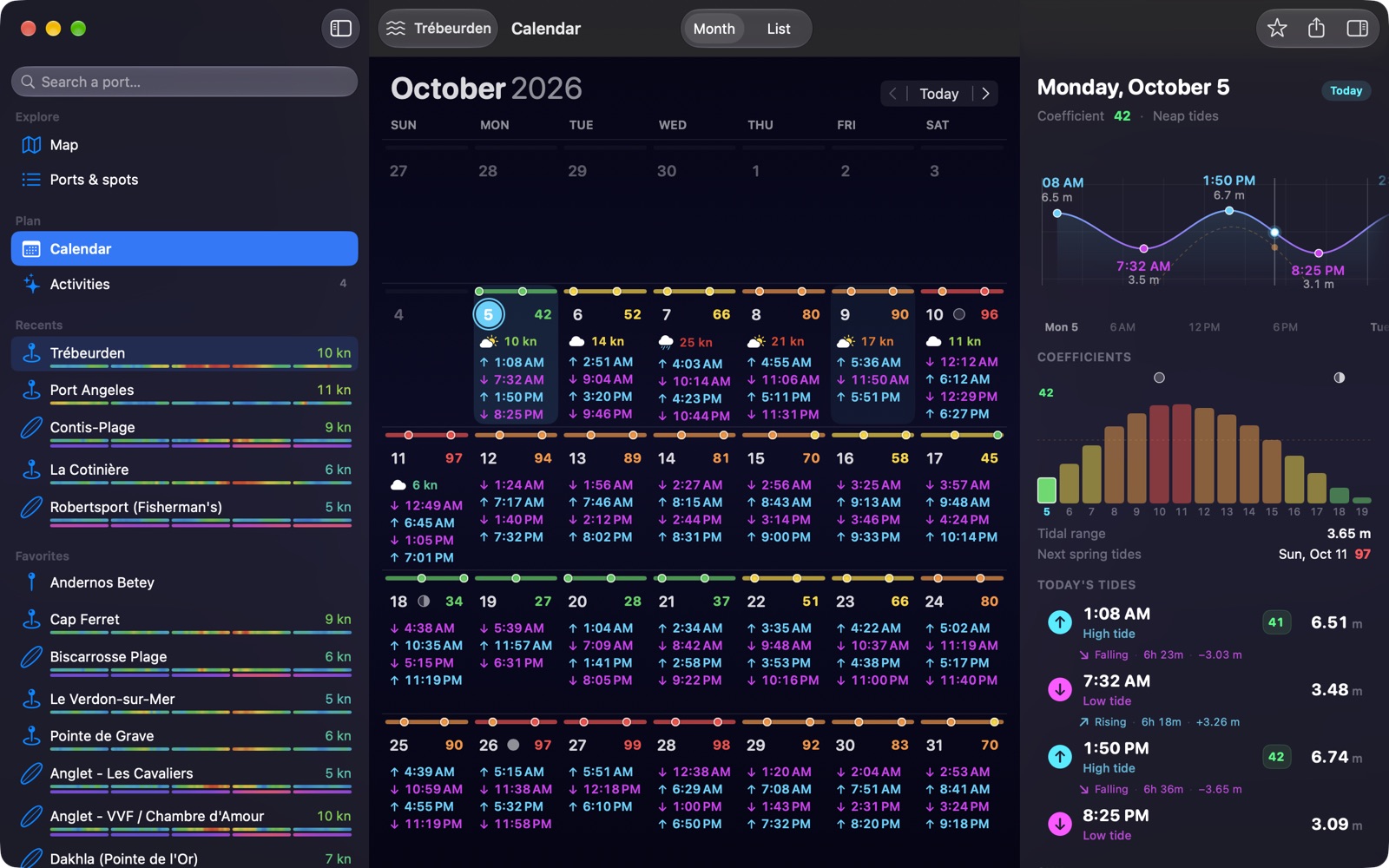
Tide calendar on Mac: the month colored by tidal coefficients, each day's high and low tides, and the day in detail with its curve, the spring tide cycle and the tidal range
Tide calendar

A year of tides, readable at a glance.

Each day carries a thin band in the color of its coefficient, from neap to spring tides, with a dot for each high tide. Pick a day: its curve, high and low tide times, tidal range, sun, moon and the coefficient cycle over two weeks appear beside it. Swipe the curve and the days roll by. As a month or a list.

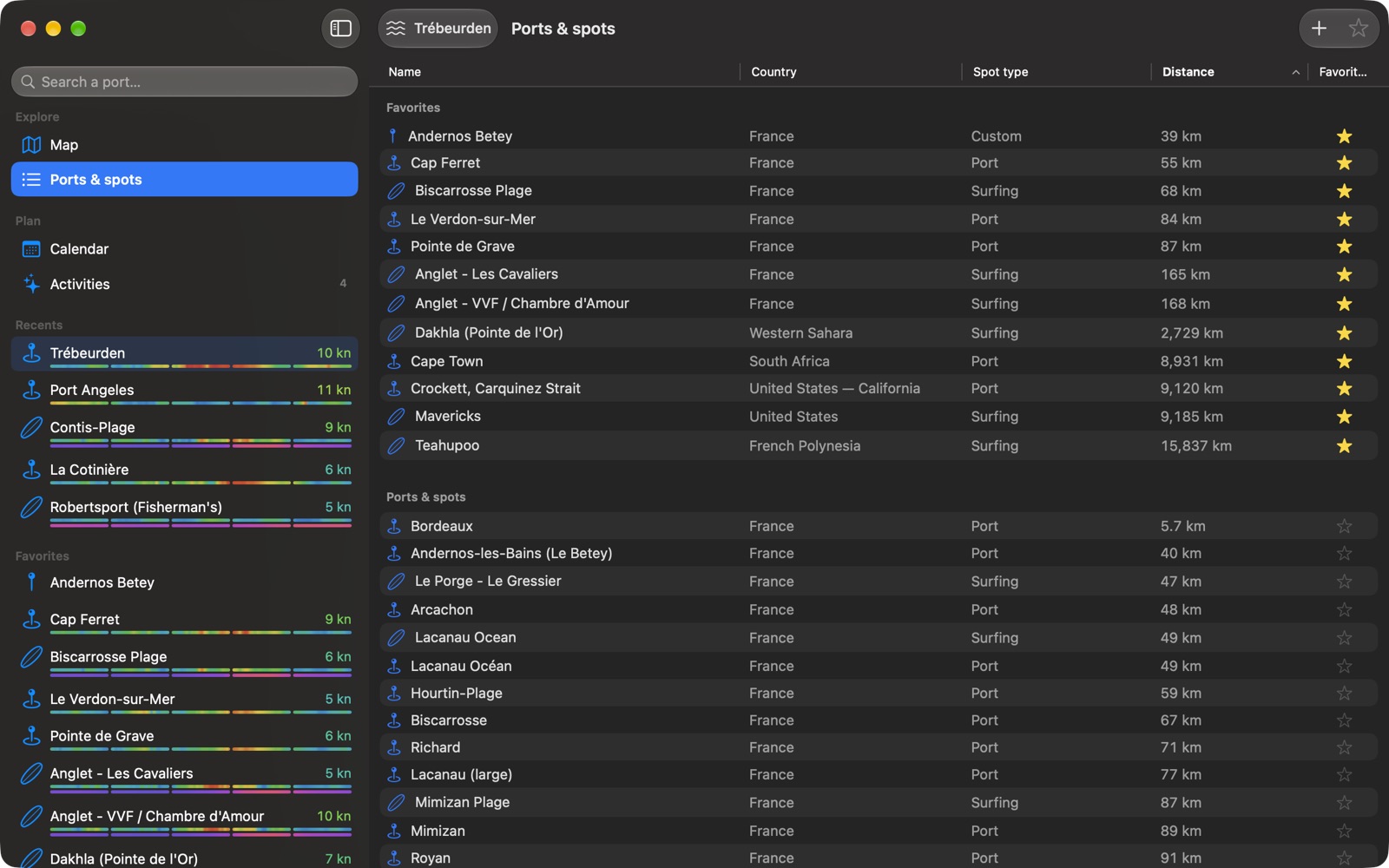
Ports and spots on Mac: a Finder-style list sorted by distance, favorites first, with country, spot type and a star on every row
Ports & spots

Over 3,500 ports and 2,100 kite, wing, windsurf and surf spots, sorted like the Finder.

Your favorites first, then every port and spot in the world by distance. Search by name, region or country with ⌘F, star a spot in one click, and create your own spot by clicking on the map: it takes the tide of its reference port, adjusted to its own high tide.

The details that make a Mac app

Keyboard, trackpad, mouse.

A curve you read with a press and hold

Hold down the mouse button or the trackpad click on the curve: time, water height and wind appear, like a long press on iPhone. Scroll it with the trackpad or drag it with the mouse, and it glides on with momentum.

Keyboard shortcuts

⌘1 to ⌘3 for Tide, Wind and Surf, ⌥⌘1 to ⌥⌘5 to switch views, ⌘F to search, ⌘D to add a favorite, ⌘, for settings.

Widgets on the desktop

Tides, tides for a chosen port, wind and surf, on your desktop or in Notification Center. One click opens the right spot, in the right mode.

A clean weather view

One line per day: sky, rain, temperature range and wind. One click and the day opens in three-hour steps, with the moon, the sea and the water.

Measured wind, not just forecast

The weather station nearest your spot: speed, gusts, direction and the age of the reading, next to the forecast — never blended together.

Light on your Mac

When the window is hidden or minimized, the app pauses its animations. Tides are computed on your Mac, with no server and no connection.

Who it's for

For everyone who reads the sea.

Tide It was born at the water's edge, for riders. But tide, wind and swell matter to many more people.

KitesurfingKitefoilingWingfoilingWindsurfingSailing and boatingSurfingBodyboardingPaddleboardingShore fishingSea fishingSea kayakingCoastal hiking
Native Mac app

Not a stretched iPhone app.

Many tide apps simply let their iPhone version run on the Mac. Tide It was rewritten for the Mac.

iPhone app on MacTide It for Mac
Sidebar with spots, favorites and recents—Yes
Curve across the whole window, details beside it—Yes
Read values with a press and hold—Yes
Keyboard shortcuts and menusPartialYes
Desktop widgets—Yes
Freely resizable windowLimitedYes
At a glance

Tide It for Mac, by the numbers.

CompatibilitymacOS 26 or later
PriceFree · optional Premium, first 15 days free
SubscriptionOne for iPhone, iPad and Mac
Coverage3,500+ ports · 2,100+ kite, wing, windsurf and surf spots · 82 countries
TidesComputed on the Mac, available offline
Languages12, from English to Japanese
SyncFavorites, spots and settings via iCloud
PrivacyNo ads, no account, no tracking
Also oniPad, iPhone and Apple Watch

And coming to Android

An Android app is in development, with the same curve, the same real wind and the same GO windows. It is not available yet.

FAQ

Questions about the Mac version

Is Tide It free on Mac?

Yes. Tides, coefficients, favorites and widgets are free. Premium adds live real wind, the wind map, 7-day GO windows, alerts and the 12-month calendar. The first 15 days are free.

Does my iPhone subscription work on Mac?

Yes. It is the same app on the App Store: one Premium subscription unlocks iPhone, iPad and Mac. Your favorites, custom spots and settings sync through your iCloud.

Which version of macOS do I need?

macOS 26 or later.

Do tides work offline on Mac?

Yes. Tide times, heights and coefficients are computed on the Mac by harmonic analysis. Only wind, weather and swell need a connection.

Do alerts fire when the window is closed?

Closing the window does not quit the app: its alerts keep running. Tide and sun alerts are scheduled in advance; wind alerts are checked while the app is open.

Is there an Android version?

An Android app is in development. It is not available yet.

Your next session, seen from your desk.

Free on Mac, iPhone, iPad and Apple Watch. First 15 days of Premium free.

Download on theMac App Store